Working demos · real files, all downloadable
PDF extraction toolkit
Four things clients actually ask for, each run against a real source PDF and each producing a real file you can open. Nothing here is a mockup or a screenshot.
Mode 1 — tables → Excel
Merged cells, subtotals, live formulas
XLSXMerged category cells are unmerged and forward-filled so sort and filter work. Every subtotal is a live =SUM(), never a pasted number — edit a row and the totals move.
Region  Branch          Units  Revenue
North   Delhi           1,240  892,400
        Chandigarh      860    611,200
        Lucknow         705    498,350
        North subtotal  =SUM(C2:C4)  =SUM(D2:D4)
...
        GRAND TOTAL     =C5+C9+C12   =D5+D9+D12
✓ 16/16 totals reconcile against the PDF · 0 merged cells · autofilter A1:D13
Mode 2 — plain text → single-column Excel
One row per logical section
XLSXFor the common "50 pages of plain text into one column, new row per section" job. Page number is carried alongside so nothing loses its origin.
Why blank-line splitting fails: PDFs produced by most layout engines contain no blank lines at all in the text layer. Sections are detected by measuring the document's own line pitch and splitting on gaps materially larger than it.
✓ 10 sections extracted across 2 pages
Mode 3 — paragraphs → one per row
Prose only, tables and headings excluded
XLSXTable rows are not paragraphs, so table regions are excluded. Headings are split off by font size — without that a heading gets glued onto the paragraph beneath it, because the gap under a heading is smaller than the gap between paragraphs.
Page  #  Paragraph                                              Words
1     1  Quarterly Operations Review                              3
1     2  Output across the four operating regions rose 12.4 …    113
1     3  The chart above shows indexed throughput by month …     27
2     4  The table below summarises performance by region …      14
2     5  Guidance for the coming quarter is unchanged …          57
✓ 5 clean paragraphs · word counts included · no table rows leaked in
Mode 4 — embedded images → PNG + manifest
Images out at original resolution
PNGEvery embedded raster pulled at its native size, CMYK converted to RGB, with a manifest recording which page each came from and its dimensions.

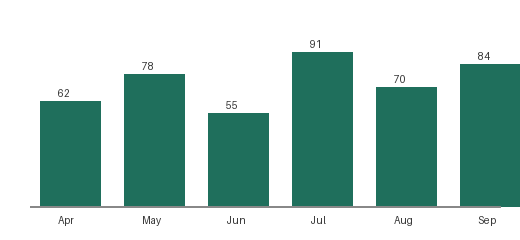
✓ 2 images extracted — 140×140 and 520×240, both RGB
The question that decides scope on any of these. Is your PDF digitally generated, or scanned? Everything above works because the source has a real text layer. A scan does not — that needs OCR, and OCR accuracy depends entirely on image quality. I would rather see one sample page and tell you which you have than promise error-free numbers and discover it later.